
Manual data entry is one of the most overlooked sources of profit loss in modern businesses.
It slows down operations, increases the risk of human error, and consumes valuable employee time that could be used for higher-impact work.
Manual data entry is one of the biggest hidden costs in modern businesses.
In 2026, the solution is not hiring more people. It is eliminating repetitive data processes through automation and system integration.
For businesses operating across multiple platforms such as CRMs, ERPs, accounting systems, and internal tools, manual data handling creates hidden inefficiencies that compound over time.
This is where companies like Fantech Labs focus: transforming disconnected workflows into automated, reliable systems.
What Is Manual Data Entry and Why Is It Still a Problem?

Manual data entry refers to the process of transferring, updating, or managing information across systems by hand.
This includes:
- copying data between spreadsheets and platforms
- updating CRM records manually
- entering customer, sales, or financial data repeatedly
- reconciling data across disconnected tools
Manual data entry means humans are doing work that systems should handle automatically.
The real cost of manual data entry

Manual data entry does not just waste time. It creates compounding problems across the business.
1. Productivity loss
Teams spend hours on repetitive tasks instead of focusing on growth.
2. Higher error rates
Even small mistakes can lead to:
- incorrect reporting
- poor decisions
- operational delays
3. Slower decision-making
Without real-time data:
- approvals slow down
- insights become outdated
- opportunities are missed
👉 Manual data entry reduces both speed and accuracy at the same time.
Why manual data entry is still a problem in 2026
Even with modern tools, many businesses still rely on manual processes because:
- Systems are not integrated
- Data is stored in multiple platforms
- Teams rely on spreadsheets as connectors
- Automation is not prioritized early
👉 The real issue is not effort. It is system design.
In early-stage businesses, manual processes may appear manageable.
However, as systems grow:
- more tools are introduced
- more data flows between platforms
- more dependencies are created
Without automation, complexity increases.
This is something we see in almost every growing business.
The more tools they adopt, the more manual work they create.
The Core Issue: Disconnected Systems
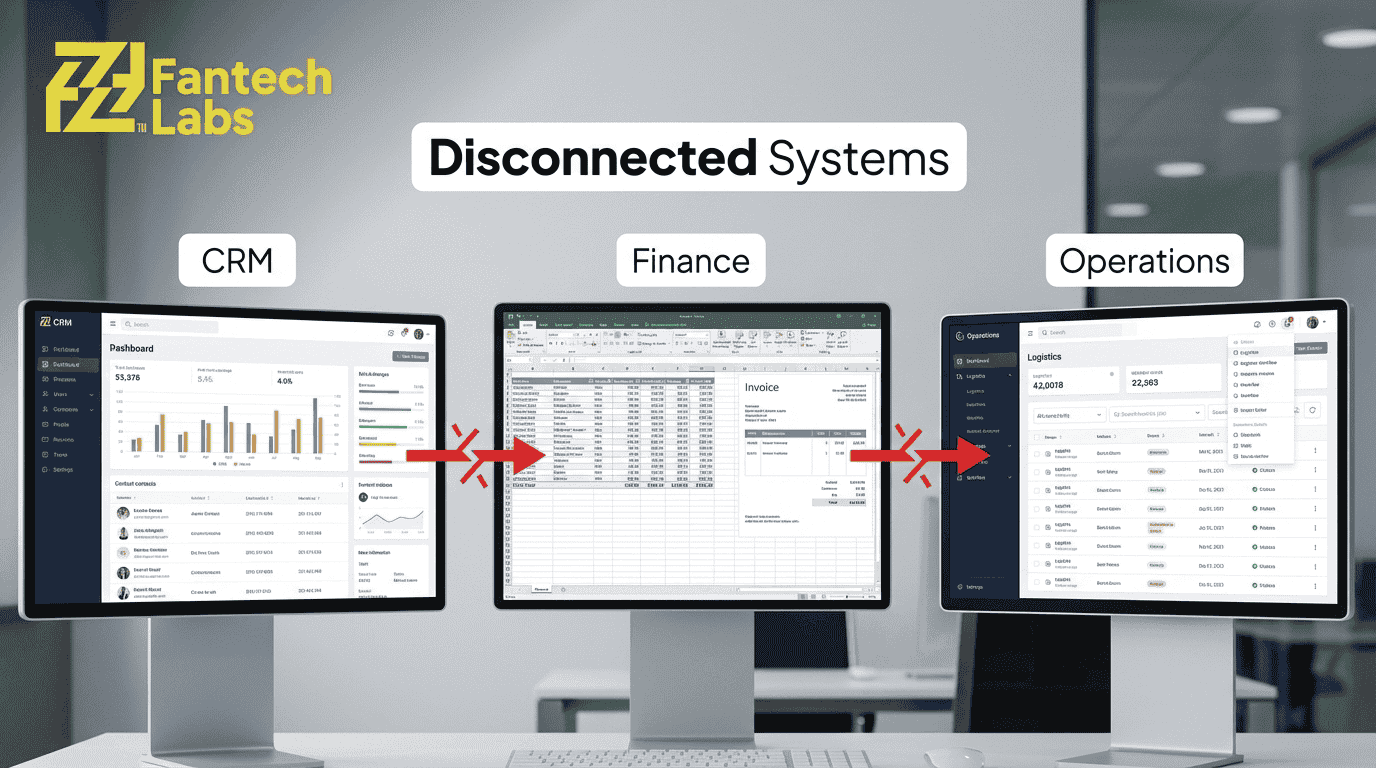
Most manual data entry exists because systems are not integrated.
For example:
- sales data lives in CRM
- financial data lives in accounting software
- operational data lives in internal tools
When these systems do not communicate automatically, teams are forced to bridge the gap manually.
👉 Insight: Manual work is often a symptom of poor system integration.
What a Modern Solution Looks Like
Instead of relying on manual workflows, businesses can:
- connect systems through APIs
- automate data synchronization
- build centralized data pipelines
This allows:
- real-time updates
- reduced errors
- faster decision-making
If your team is spending time moving data between systems instead of using it, the issue is not workload it is system design.
Fantech Labs helps businesses replace manual data workflows with integrated, automated systems that improve efficiency and reduce operational risk.
Where Does Manual Data Entry Hurt Businesses the Most?
Manual data entry becomes a serious problem when it exists across critical business systems. These are the areas where speed, accuracy, and real-time data matter the most.
In most organizations, the biggest impact is seen in:
- sales and CRM workflows
- finance and accounting systems
- operations and internal tools
CRM and Sales Operations
Sales teams rely heavily on accurate and up-to-date data.
However, when data entry is manual:
- leads are entered late or incorrectly
- follow-ups are delayed
- duplicate records are created
For example:
A sales rep collects leads from multiple sources (website, ads, email), but manually enters them into a CRM.
This creates:
- delays in response time
- missed opportunities
- inconsistent pipeline tracking
👉 Insight: In sales, even small delays in data entry can directly affect revenue.
Finance and Accounting Systems
Manual data entry in finance introduces risk at a much higher level.
Common issues include:
- manual invoice entry
- reconciliation errors
- delayed financial reporting
For example:
Transaction data from a payment system needs to be manually recorded in accounting software.
This leads to:
- mismatched records
- reporting delays
- increased audit complexity
👉 Insight: In finance, errors are not just inconvenient, they can be costly.
Operations and Internal Workflows
Operational teams often work across multiple tools.
Without integration:
- Data is copied between systems
- Workflows depend on manual updates
- Process visibility is reduced
For example:
An order placed in one system needs to be manually updated in inventory and fulfillment tools.
This creates:
- Delays in processing
- A higher chance of mistakes
- lack of real-time tracking
What Automation Looks Like in Real Business Scenarios
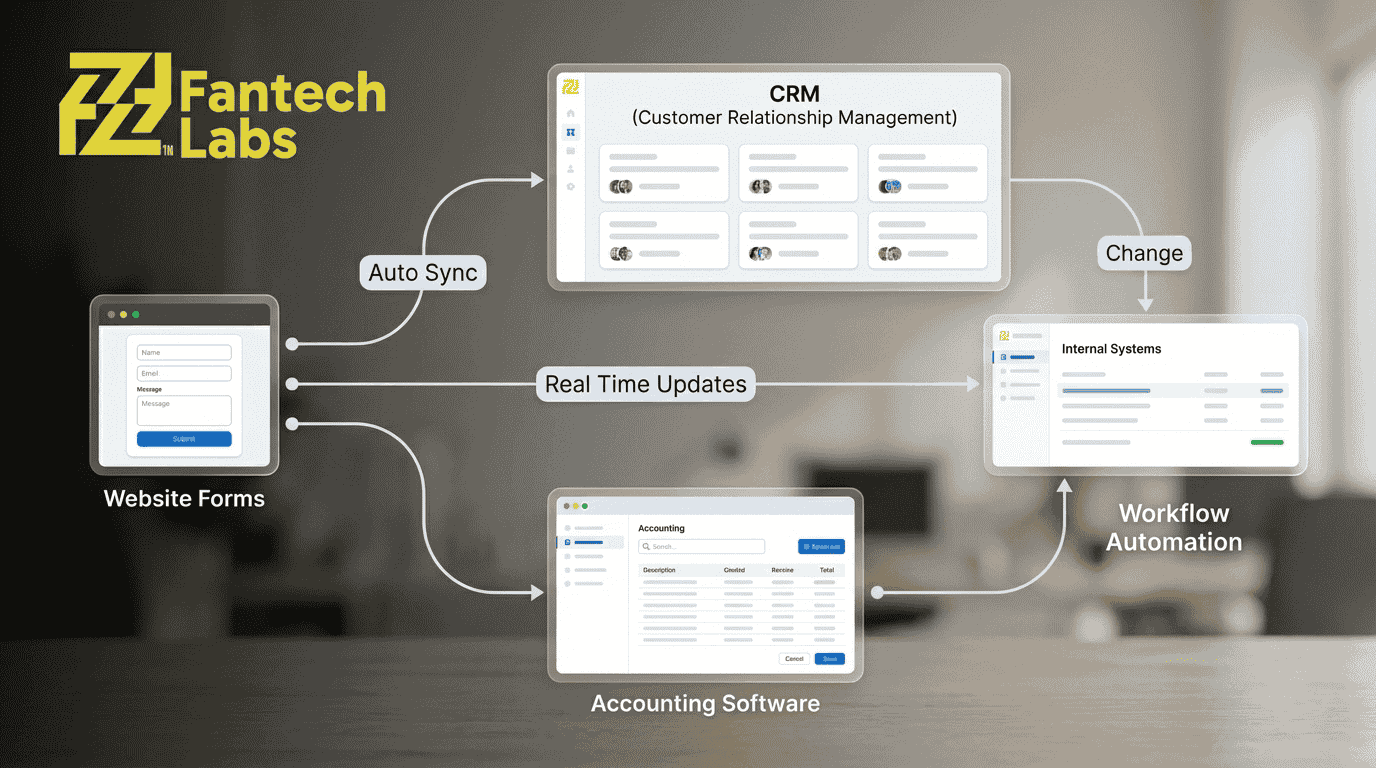
Replacing manual data entry does not require a full system overhaul. It starts with connecting existing tools.
Example 1: CRM Automation
Instead of manually entering leads:
- website forms → automatically update CRM
- lead data → assigned to sales teams instantly
- follow-ups → triggered automatically
Example 2: Financial Data Integration
Instead of manual reconciliation:
- payment platforms → sync with accounting software
- transactions → recorded in real-time
- reports → generated automatically
Example 3: Workflow Automation
Instead of manual coordination:
- order systems → update inventory instantly
- status updates → triggered across platforms
- notifications → automated for teams
👉 Insight: Automation removes repetitive work while improving data accuracy and speed.
The Role of AI in Data Automation

Modern automation is no longer limited to basic integrations.
AI-driven systems can:
- extract data from documents
- categorize and validate information
- trigger workflows based on patterns
For example:
- invoices can be processed automatically
- customer data can be enriched without manual input
- repetitive decision-based tasks can be handled intelligently
👉 Insight: AI enhances automation by reducing the need for human intervention even further.
Why Businesses Delay Automation
Despite clear benefits, many companies delay fixing manual workflows.
Common reasons include:
- fear of system complexity
- reliance on existing processes
- uncertainty about implementation
However, over time:
- manual work increases
- inefficiencies compound
- operational costs rise
If your business relies on multiple systems that do not communicate properly, manual data entry is likely slowing your growth.
Fantech Labs helps businesses:
- connect platforms through integration
- automate data workflows
- reduce dependency on manual processes
The result is a more efficient system that supports growth instead of limiting it.
How Should Businesses Replace Manual Data Entry With Automation?

Replacing manual data entry is not about installing a single tool. It requires a structured approach that focuses on system design, data flow, and integration strategy.
Most businesses fail at automation because they try to automate tasks instead of fixing the underlying system architecture.
👉 The goal is not just automation. 👉 The goal is building connected systems that eliminate manual work entirely.
Step 1: Identify Where Manual Work Actually Exists
Before implementing any solution, businesses need to map their workflows.
This includes:
- where data is being entered manually
- how often data is transferred between systems
- which processes depend on human intervention
In many cases, manual entry is spread across multiple departments, making it less visible.
What to Look For
- repeated data entry across tools
- spreadsheets used as “bridges” between systems
- delays caused by manual updates
- inconsistent data across platforms
👉 Insight: If the same data exists in multiple places and needs updating, automation is required.
Step 2: Analyze System Gaps and Integration Opportunities
Manual processes usually exist because systems are not connected.
The next step is to identify:
- which platforms need to communicate
- what data needs to flow between them
- how frequently updates should occur
This is where API-based integration becomes critical.
Common Integration Points
- CRM ↔ marketing platforms
- payment systems ↔ accounting software
- internal tools ↔ external services
By connecting these systems, data flows automatically instead of being manually transferred.
Step 3: Design a Scalable Data Flow
.png)
Automation should not be implemented as isolated fixes.
Instead, businesses need a structured data flow where:
- data enters the system once
- flows automatically across platforms
- updates in real-time or near real-time
This reduces duplication and ensures consistency.
👉 Insight: The best systems are designed so data is entered once and reused everywhere.
Step 4: Introduce Automation and AI Layers
Once systems are connected, automation can be applied.
This includes:
- triggering workflows automatically
- syncing data across systems
- eliminating repetitive updates
AI can further enhance this by:
- extracting structured data from documents
- validating inputs
- making rule-based decisions
Example Workflow Transformation
Before:
- lead captured → manually entered → assigned → followed up
After:
- lead captured → automatically synced → assigned instantly → follow-up triggered
Step 5: Monitor, Optimize, and Scale
Automation is not a one-time setup.
As businesses grow:
- new tools are introduced
- workflows evolve
- data volume increases
Systems need to be monitored and optimized continuously to ensure performance and reliability.
Technical vs Business Approach
Many automation efforts fail because they focus only on tools.
A successful approach combines:
Technical Layer
- APIs
- integrations
- automation workflows
- data pipelines
Business Layer
- process optimization
- workflow design
- operational efficiency
👉 Insight: Technology alone does not solve the problem. The process must be designed correctly.
What Happens When Automation Is Done Right
When manual data entry is replaced with structured automation:
- teams spend less time on repetitive work
- data accuracy improves
- decision-making becomes faster
- systems scale without operational friction
If your business is still relying on manual data processes, the challenge is not just workload — it is system inefficiency.
Fantech Labs helps organizations:
- analyze existing workflows
- design scalable system architecture
- implement automation and integration solutions
This allows businesses to move from fragmented operations to connected, efficient systems.
What Is the ROI of Eliminating Manual Data Entry?
.png)
Eliminating manual data entry is not just an operational improvement. It has a direct financial impact on efficiency, cost savings, and scalability.
The return on investment (ROI) comes from three main areas:
- reduced labor cost
- increased operational speed
- improved data accuracy
Cost Savings From Reduced Manual Work
Manual processes require ongoing human effort.
When automation is implemented:
- repetitive tasks are eliminated
- fewer hours are spent on low-value work
- teams can focus on revenue-generating activities
Even small reductions in manual workload can translate into significant savings over time.
Faster Operations and Decision-Making
Automation enables real-time data flow across systems.
This allows:
- faster approvals
- immediate data availability
- quicker response to business changes
👉 Insight: Speed is not just a convenience. It directly affects competitiveness.
Improved Accuracy and Reduced Risk
Manual data entry increases the likelihood of errors.
Automation reduces:
- incorrect entries
- duplicate data
- inconsistencies across systems
This leads to:
- more reliable reporting
- better decision-making
- fewer operational disruptions
What Happens If Businesses Do Not Fix This Problem?
Ignoring manual data inefficiencies creates long-term risks.
Increasing Operational Costs
As the business grows:
- data volume increases
- manual workload expands
- more resources are required
This leads to higher operational expenses without proportional growth in efficiency.
Slower Growth
Manual systems create bottlenecks.
This results in:
- delayed workflows
- reduced productivity
- limited scalability
Data Inconsistency
Disconnected systems lead to fragmented data.
This affects:
- reporting accuracy
- forecasting reliability
- strategic decision-making
👉 Insight: The cost of not automating increases over time, not decreases.
Strategic Perspective
Automation is not just a technical upgrade. It is a business decision.
Organizations that invest in structured systems:
- scale faster
- operate more efficiently
- reduce long-term costs
Those that rely on manual processes:
- face increasing complexity
- struggle with growth
- lose operational control
Final Thoughts
.png)
Manual data entry may seem manageable in the short term, but it becomes a major limitation as businesses grow.
The transition to automated, integrated systems allows companies to:
- streamline operations
- improve data reliability
- support long-term scalability
The goal is not just to reduce manual work. It is to build a system that supports growth without increasing operational friction.
If your team is spending time on repetitive data tasks instead of strategic work, it is a clear signal that your systems need to be optimized.
Fantech Labs helps businesses:
- identify inefficiencies in data workflows
- design scalable integration architecture
- implement automation solutions tailored to their operations
This approach allows you to reduce manual workload, improve system reliability, and scale without operational bottlenecks.
Frequently Asked Questions
Is automation only for large businesses?
No. Automation is valuable for businesses of all sizes, especially those managing multiple tools or growing data volumes.
How long does it take to implement automation?
The timeline depends on system complexity, but many workflows can be automated in phases without disrupting operations.
How can businesses reduce manual data entry?
Businesses can reduce manual data entry by integrating systems, automating workflows, and using APIs to sync data across platforms.
What tools are used for data automation?
Common tools include APIs, workflow automation platforms, CRM integrations, and AI-based data processing systems.
Do I need to replace my current systems?
Not necessarily. Most automation solutions focus on connecting existing systems rather than replacing them.
Can automation reduce errors completely?
While no system is perfect, automation significantly reduces human errors and improves consistency.
What is the first step to automate data processes?
The first step is identifying where manual data entry exists and understanding how systems interact.
About the Author
Written byAli Raza, Lead Salesforce Architect & Enterprise Integration Specialist at Fantech Labs. Ali specializes in helping Canadian B2B companies eliminate data silos through advanced software implementations and third-party integrations. With deep expertise in enterprise architecture, API connectivity, and automated workflows, he transforms fragmented software stacks into unified, high-performance digital ecosystems.