_ZvIz0i.webp)
Key Takeaways
- A realistic 2026 starter budget for a Canadian small business is $0 to $28 CAD per user per month for an AI assistant, $30 to $100 per month for an automation platform, and under $50 per month in API usage at typical SME volumes.
- Professionally built custom automations cost $2,500 for a readiness assessment up to $50,000 or more for a full implementation, with monthly operating costs of $500 to $5,000 depending on system complexity.
- The right first automation for a new business is the task your team complains about most, something repetitive, clearly defined, and done the same way every time.
- A 2025 survey found that Canadian small businesses using AI tools reported an average 28% reduction in time spent on administrative tasks.
- New business owners should start with one automation that solves a real problem, not ten that solve ten imagined ones. Most useful AI workflows cost under $150 per month in software to run once built.
- Canadian businesses must account for PIPEDA compliance when automating workflows that handle customer data. Tools with Canadian data residency options are preferred for businesses handling sensitive client information.
- Fantech Labs has taken clients from 10 to 100 plus monthly deals by automating lender workflows. The same principles apply to any founder-run business spending hours on tasks that follow a predictable pattern.
Why New Business Owners Are Thinking About AI Automation in 2026
Most new business owners start with a simple problem: there are not enough hours in the day. The work that needs doing is often repetitive, clearly defined, and follows the same pattern every time. Entering leads into a CRM. Following up on unanswered quotes. Sending invoice reminders. Routing inbound inquiries to the right team member. Generating weekly reports from data that already exists.
These tasks do not require judgment. They require consistency, and that is exactly what automation does well. Canadian small businesses using AI tools reported an average 28% reduction in time spent on administrative tasks. For a founder running a 3-person operation, a 28% reduction in administrative time is the equivalent of reclaiming one full day per week.
In 2026, the barrier to entry for AI automation has dropped significantly. Most Canadian SMEs get meaningful results for under $150 per month in software. The question for new business owners is no longer whether AI automation is accessible, it is where to start and how to avoid spending money on tools that do not solve a real problem.
Where Should a New Business Start With AI Automation?
The most common mistake new business owners make with AI automation is starting with the tool rather than the problem. They sign up for a platform, explore its features, and then try to find a use for it. The right approach is the opposite: identify the specific workflow causing the most friction, then find the simplest tool that eliminates it.
A useful framework for identifying your first automation is to ask three questions about any task you are considering:
Does it happen the same way every time? Automation works on patterns. If the task requires judgment calls, context, or exceptions that change frequently, it is not a good first automation candidate.
Does it happen often enough to justify the setup time? A task that takes 30 minutes once a month is not worth automating. A task that takes 20 minutes every day is worth automating immediately.
Does a mistake or delay in this task cost you money or a customer relationship? Lead follow-up, invoice reminders, and appointment confirmations are high-stakes repetitive tasks. Getting them wrong has direct consequences. Getting them right consistently builds trust.
| Workflow Type | Automation Potential | Typical Trigger | Example Tool | |
|---|---|---|---|---|
| Lead follow-up emails | Very high | New form submission | Zapier + Gmail | |
| Invoice reminders | Very high | Invoice due date approaching | FreshBooks AI, QuickBooks | |
| Appointment confirmations | Very high | Booking created | Calendly + SMS | |
| CRM data entry from emails | High | New email from prospect | HubSpot Breeze AI | |
| Social media scheduling | High | Content calendar date | Buffer, Hootsuite | |
| Weekly reporting | High | Scheduled trigger | n8n + Google Sheets | |
| Customer support triage | Medium | Inbound message received | Tidio, Intercom AI | |
| Proposal generation | Proposal generation | Medium | Deal stage change in CRM | GoHighLevel, PandaDoc |
What Does AI Automation Actually Cost for a New Business in Canada?
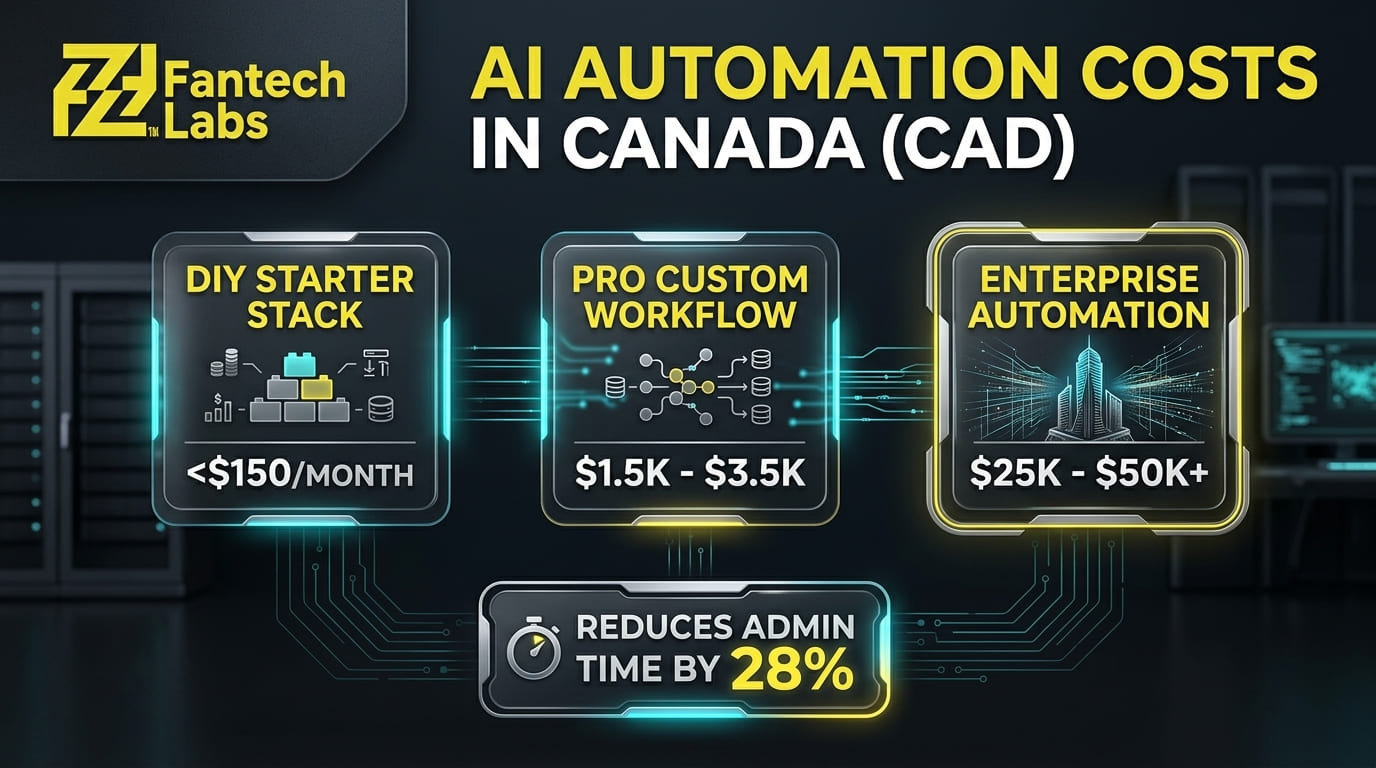
AI automation for a Canadian small business in 2026 costs between $2,500 for a readiness assessment and $50,000 or more for a full custom implementation, with monthly operating costs of $500 to $5,000 depending on system complexity. Those numbers reflect the full range, from a startup automating one email sequence to an enterprise replacing a manual operations team.
For a new business owner starting out, the relevant numbers are at the lower end of that range.
| Implementation Type | What Is Included | Typical CAD Cost |
|---|---|---|
| DIY with off-the-shelf tools | Software subscriptions, self-configured | $0 to $150/month |
| Single workflow build (professional) | One defined process, common integrations | $1,500 to $3,500 one-time |
| Multi-workflow implementation | 3 to 5 workflows, discovery, testing, documentation | $7,500 to $25,000 one-time |
| Full custom automation system | Deep integrations, CRM/ERP connections, ongoing support | $25,000 to $50,000+ |
| Monthly retainer (ongoing support) | Maintenance, optimization, new workflow additions | $300 to $800/month |
Professionally built automations run $1,500 to $3,500 per workflow as a one-time cost. For a new business owner who cannot configure tools independently, having one critical workflow built professionally and then maintained is often the most cost-effective starting point. You get the time savings immediately without spending months learning the platform.
What AI Tools Should New Canadian Business Owners Know About?
The Canadian market has specific considerations that most AI tool guides written for U.S. audiences do not address: PIPEDA compliance, Canadian data residency, CAD pricing, and HST/GST/PST support. Here is the tool landscape that matters for new Canadian business owners in 2026:
| Category | Best Free Option | Best Paid Option (CAD approx.) | Canadian Notes |
|---|---|---|---|
| Canadian Notes | Claude (free tier) or Gemini | Claude Pro ~$25/month CAD | Claude stronger on documents and writing |
| Workflow automation | Zapier free (100 tasks/month) | Make Core $9/month, n8n $27/month | n8n self-hosted gives best data control |
| CRM + automation | HubSpot free CRM | GoHighLevel ~$135/month CAD | GoHighLevel best value for service businesses |
| Email marketing | Mailchimp free (500 contacts) | Klaviyo, ActiveCampaign | Check data residency for PIPEDA |
| Accounting + AI | Wave (free) | FreshBooks, QuickBooks Online | Both have strong Canadian tax support |
| Customer support | Tidio free tier | Intercom, Tidio Pro | AI chat triage reduces response time |
| Content creation | Canva free AI features | Jasper, Copy.ai | Canva simplest for non-designers |
For Canadian service businesses with fewer than 50 active clients, GoHighLevel is the most cost-efficient choice: CRM, email marketing, SMS, booking calendars, client portals, and AI content generation in one subscription at approximately $135 CAD per month.
The 5 AI Automations That Deliver the Most Value for New Business Owners
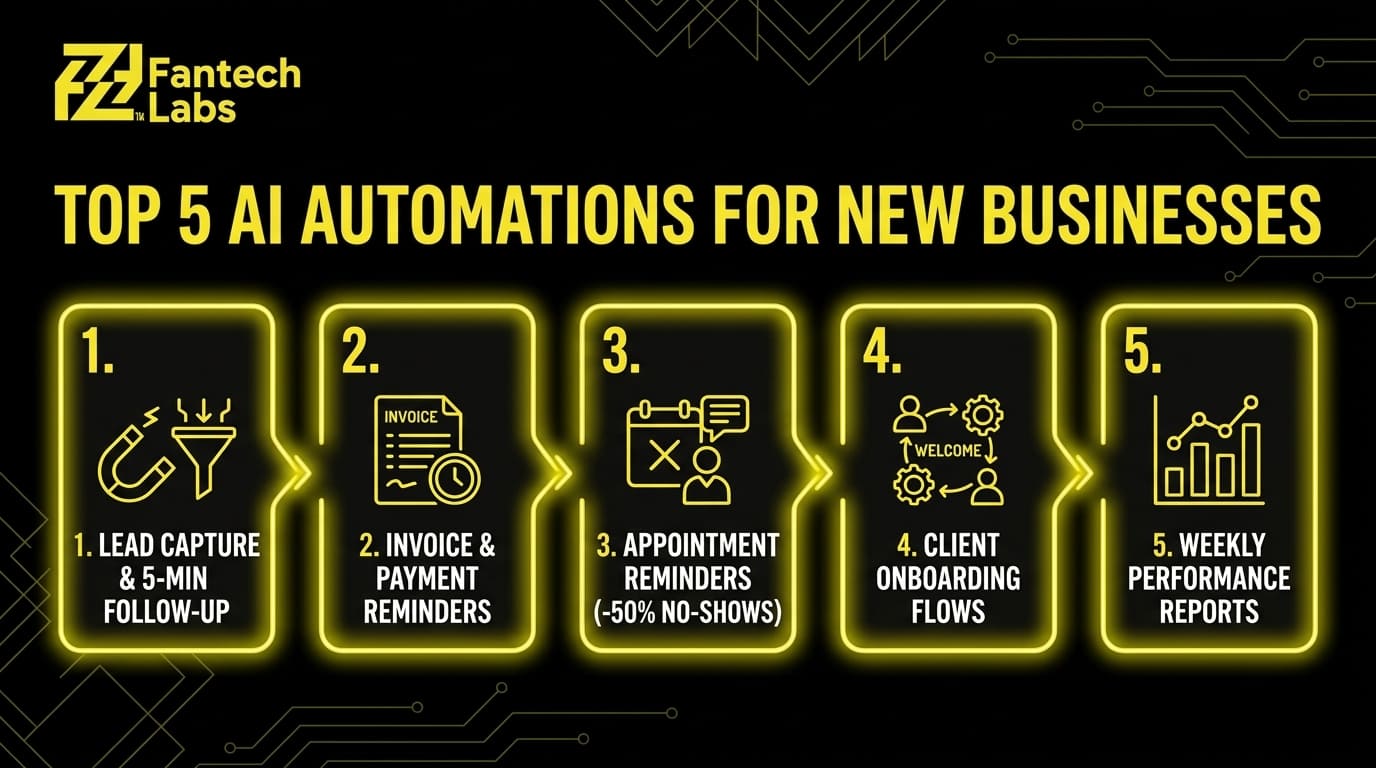
1. Lead Capture and Follow-Up
Every lead that submits a form on your website, sends an inquiry email, or messages on social media should receive a response within 5 minutes. Research consistently shows that response speed in the first 5 minutes is the single biggest predictor of lead conversion. Manually achieving that is impossible once a business reaches any real volume. Automation makes it the default.
A basic lead follow-up automation connects your contact form to your CRM, sends an immediate personalized acknowledgment email, creates a follow-up task for a human review, and sends a reminder if the lead has not been contacted within 24 hours. This can be built with Zapier or Make in under 2 hours for a technically capable founder, or professionally built for $1,500 to $2,500.
2. Invoice and Payment Reminders
Late payments are the most common cash flow problem for new Canadian businesses. Automating invoice reminders removes the awkwardness of manually chasing clients and ensures reminders go out consistently, at the right intervals, every time. Most accounting platforms including FreshBooks, QuickBooks, and Wave have this built in at no additional cost. If you are not using it already, enabling it takes under 15 minutes.
3. Appointment Confirmation and Reminder Sequences
No-shows cost service businesses real money. An automated sequence that sends a confirmation immediately after booking, a reminder 48 hours before, and a final reminder 2 hours before the appointment reduces no-shows by 30 to 50% in most service business contexts. Calendly handles this natively. GoHighLevel allows fully customized sequences with SMS and email combined.
4. Customer Onboarding Sequences
Every new client needs the same information when they start working with you. Contracts, welcome information, intake forms, next steps, and expectations. Sending these manually for each new client takes 20 to 40 minutes and introduces inconsistency. An automated onboarding sequence triggered by a deal stage change in your CRM sends the right documents in the right order without any manual steps. This is one of the highest-value first automations for service businesses and professional firms.
5. Weekly Performance Reports
A new business owner who is not looking at their numbers every week is flying blind. Automating a weekly summary that pulls key metrics from your CRM, booking system, and accounting platform into a single email or dashboard takes setup time once and then runs permanently. n8n and Zapier both support this. Google Looker Studio can pull from multiple sources into a visual dashboard at no cost.
What Is the Difference Between DIY Automation and Hiring a Team?
New business owners face a choice between configuring automation tools themselves using no-code platforms and hiring a team to build custom automation for them. Both paths work. The right choice depends on technical confidence, available time, and how complex the workflow actually is.
| Factor | DIY (No-Code) | Professional Build |
|---|---|---|
| Setup time | Hours to weeks depending on complexity | Handled by the team |
| Upfront cost | Low (software only) | $1,500 to $25,000+ |
| Complexity ceiling | Medium (Zapier/Make handle most standard workflows) | No ceiling (custom code and API access) |
| Maintenance | Owner responsible | Team handles updates |
| Integration depth | Limited by connector availability | Full API access to any system |
| Best for | Standard workflows, common tools | Custom logic, legacy systems, CRM/ERP integration |
A no-code platform like Zapier or Make is something you operate yourself. An AI automation agency designs, builds, and runs AI and automation for your business so your team does not have to. The good ones map your processes first, recommend tools without bias toward any one vendor, build the integrations and AI agents, then maintain what they ship.
For most new business owners, the right path is to start with a DIY tool for the simplest, most standard workflow to build familiarity, then engage a professional team for the workflows that involve custom CRM or ERP connections, legacy systems, or logic that no-code tools cannot handle cleanly.
PIPEDA and AI Automation: What Canadian New Business Owners Need to Know

Canada's Personal Information Protection and Electronic Documents Act (PIPEDA) governs how businesses collect, use, and store personal information. When you automate workflows that handle customer data, PIPEDA compliance applies to every tool in the chain.
The practical implications for new Canadian business owners using AI automation:
You must have a lawful basis for collecting customer data and for any automated processing of it. If your automation uses AI to analyze customer behavior, segment contacts, or make decisions, customers should be aware this is happening.
Tools that store customer data outside Canada may create compliance risk depending on your industry and the sensitivity of the data involved. Healthcare, legal, and financial service businesses face stricter data residency requirements than most other sectors.
Before deploying any customer-facing automation or AI chatbot, confirm where customer data is stored, whether the tool vendor has a data processing agreement available, and whether your privacy policy discloses the use of automated decision-making.
Most mainstream tools used by Canadian small businesses including HubSpot, Zapier, Make, and Google Workspace publish data processing agreements and GDPR/PIPEDA compliance documentation. Review these before connecting them to workflows that handle customer personal information.
Frequently Asked Questions
Where should a new business owner start with AI automation?
The honest answer is that the tool matters less than picking one specific workflow to fix first. For most new business owners, the best starting point is lead follow-up, invoice reminders, or appointment confirmations. These are high-frequency, high-stakes tasks that follow a consistent pattern and have a direct impact on revenue when they are delayed or missed. Start with one workflow, get it working reliably, then expand.
How much does AI automation cost for a new small business in Canada?
A realistic 2026 starter budget for a Canadian small business is $0 to $28 CAD per user per month for an AI assistant, $30 to $100 per month for an automation platform, and under $50 per month in API usage at typical SME volumes. Most SMEs get meaningful results for under $150 per month in software. Professionally built custom automations run $1,500 to $3,500 per workflow as a one-time cost for a single defined process.
What is the best AI automation tool for a Canadian startup in 2026?
There is no single best tool because the right choice depends on what you are automating and what systems you already use. For workflow automation, Zapier is the easiest starting point for non-technical founders, Make offers more flexibility at a lower cost, and n8n gives the most control for technical teams. For an all-in-one CRM plus automation platform, GoHighLevel is the most cost-efficient choice for Canadian service businesses at approximately $135 CAD per month.
Does AI automation work for service businesses or only for e-commerce?
AI automation works across all business types. Service businesses including consultants, contractors, healthcare providers, legal firms, and real estate agencies are among the most consistent beneficiaries because their workflows involve high volumes of repetitive communication, scheduling, document management, and follow-up. E-commerce businesses benefit from inventory, order, and marketing automation. The specific workflows differ by industry but the underlying principle is the same: any task that follows a consistent pattern and happens regularly is a candidate for automation.
What does Fantech Labs actually build for businesses using AI automation?
Fantech Labs builds custom AI automations and system integrations for Canadian businesses, connecting the platforms they already run and removing the manual work between them. We have taken clients from 10 to 100 plus monthly deals by automating lender workflows, built lead routing and onboarding systems for professional services firms, and connected CRM, ERP, and field operations platforms that previously required manual data transfer between them. We scope every project with a process mapping session before writing a line of code, and we support what we build after launch.
About Fantech Labs: Fantech Labs is a Calgary-based AI automation and system integration company serving businesses across Canada. We build custom automations, web applications, and integrations for founder-run businesses that need technology to work the way their operations actually run.